projects2026 · Web · Completed
Scholar Track
PhD Scholar Tracking Portal
Scholar Track guides a research scholar through four Doctoral Committee reviews and a degree stage, with a two-step approval at every milestone. One portal, three roles, a full audit trail, and an interface that reads like a well-set journal.
- Roles
- Scholar · Supervisor · R&D
- Stages
- Proposal → DC1–DC4 → Degree
- Themes
- Light & dark, first-class
- 5
- Milestones with required documents
- 2-step
- Approval: supervisor, then R&D
- 12
- Templated email notifications
- 100%
- Server-side gating and audit
01 · Overview
Built for a research office, designed like a product
The portal replaces paper files and email threads with a single source of truth. Every transition is enforced on the server, every rejection carries remarks, and every step writes an audit row.
Scholars always know what to do next; supervisors and the R&D section always know what is waiting for them, with live counters in the navigation.
- Scholar
- Registers with a one-time portal key, files the proposal, uploads milestone documents and always sees the next step.
- Supervisor
- Constitutes the Doctoral Committee, assigns a co-supervisor and approves or returns each application with remarks.
- R&D Section
- Issues portal keys, allocates supervisors, gives the final approval, records meetings and issues the degree.
- Notified at every step
- Templated HTML email for onboarding, reviews, allocations, meetings, degrees and password flows.
- Files never public
- Presigned uploads straight to object storage, then authenticated proxies stream every document.
- GitHub-inspired UI
- Hairline borders, one accent, semantic state labels and serif headings, in light and dark.
02 · Workflow
Every milestone follows the same rhythm
DRAFT → SUBMITTED → SUPERVISOR_APPROVED → RND_APPROVED → MEETING_COMPLETED
The scholar uploads and submits
Each stage lists exactly which documents are required. Uploads go straight to object storage through short-lived signed URLs, with progress, and the application cannot be submitted until every slot is filled.
- Required-document checklist
- Direct-to-bucket uploads, 10MB, PDF/JPG/PNG
- Application tracker with dates and remarks
The supervisor reviews
The scholar page puts the proposal, committee, documents and the decision form on one screen. Returning an application requires remarks, which land in the scholar's tracker and inbox.
- Committee picker, 2 to 5 members from the pool
- Approve, or return with mandatory remarks
- Email to the scholar and the R&D queue
The R&D section closes the loop
Queues with live counters show what is waiting: supervisor requests, final approvals, and meetings to record. Marking a meeting complete unlocks the next stage; on the last stage it issues the degree.
- Counters in the navigation
- One click to record a meeting or issue a degree
- Filterable scholar register with CSV export
And the journey ends with a degree
The scholar's overview turns fully green, the completion record shows the issue date, and the final email congratulates the new doctor.
03 · Design system
Light and dark, drawn from the same tokens
Switch the site theme to see the other one.
04 · Responsive
Fits a phone without a separate app
05 · Under the hood
Stack and safeguards
Built with
- Next.js 14
- TypeScript
- Prisma
- Neon Postgres
- NextAuth
- Tailwind CSS
- Zod
- S3-compatible storage
- Brevo email
- Vercel
Security model
- Role-based middleware and server-side stage gating
- Files streamed through authenticated proxies, never public URLs
- Presigned uploads verified with HeadObject before recording
- Hashed portal keys and single-use, expiring reset tokens
- bcrypt passwords, lockout after failed logins, strict CSP
06 · Gallery
Every screen, both roles
Open any screen to see it full size.
07 · Case study
How it was built
Summary
Scholar Track is a web portal that carries a PhD scholar from admission to degree through four Doctoral Committee (DC) reviews and a degree stage. Every milestone has a fixed set of required documents and a two-step approval: the supervisor first, then the Research & Development (R&D) section. The portal replaces paper files and email threads with one source of truth: server-enforced stage gating, mandatory remarks on every rejection, an audit row for every transition, and templated email at each step.
Highlights
- Three roles, one portal: scholar, supervisor (also co-supervisor for other scholars) and the R&D section.
- Five gated milestones: DC1 to DC4 and Degree, each unlocked only when the previous meeting is recorded.
- Twelve notification emails covering onboarding, reviews, allocations, meetings, degree issuance and password flows.
- GitHub-inspired interface with first-class light and dark themes and a serif editorial voice.
1. The problem
Research offices track dozens of scholars across multi-year programmes. Documents arrive by email, approvals happen in person, and nobody can answer "what is this scholar waiting on?" without opening a folder. Scholars, in turn, rarely know which step is next or why an application was returned.
2. The workflow
PROPOSAL → DC1 → DC2 → DC3 → DC4 → DEGREE → COMPLETED

per milestone:
DRAFT → SUBMITTED → SUPERVISOR_APPROVED → RND_APPROVED → MEETING_COMPLETED (or DEGREE_ISSUED)
              ↖ SUPERVISOR_REJECTED / RND_REJECTED → scholar revises and resubmits
- Onboarding. The R&D section generates a one-time portal key; the scholar registers with it.
- Proposal. Title, research domain and a proposed-work PDF, then a request for a supervisor.
- Allocation. R&D allocates a supervisor from the staff pool; this locks the proposal and opens DC1.
- Committee. The supervisor picks two to five DC members from a curated pool and, optionally, a co-supervisor.
- Milestones. The scholar uploads the required documents and submits; the supervisor approves or returns with remarks; R&D gives the final decision; R&D records the meeting, which unlocks the next stage.
- Degree. The last stage ends with the degree issued and a completion record on the scholar's overview.
3. Roles and screens
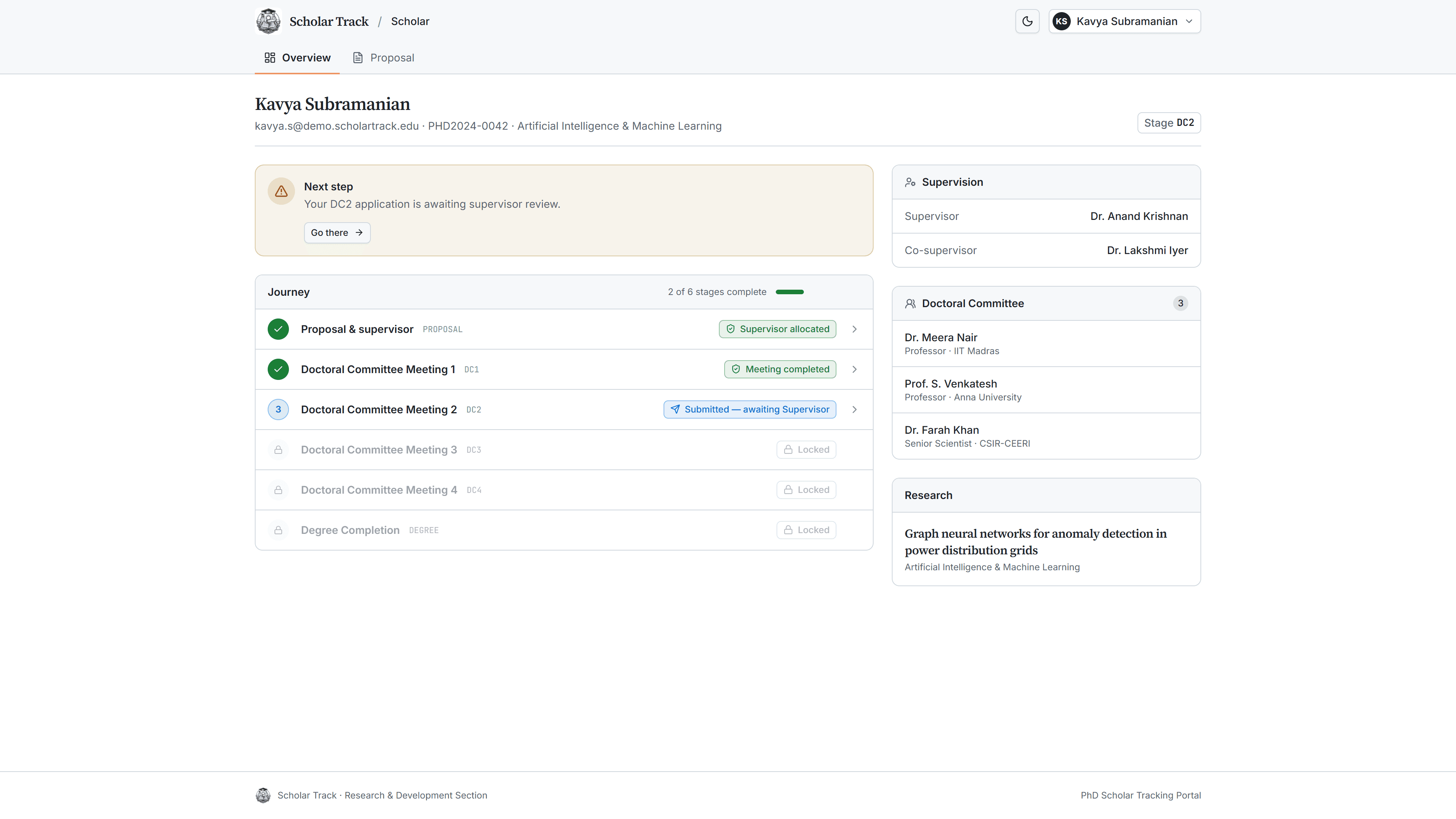
- Scholar overview: a "next step" alert, a six-stage journey list with a completion meter, supervision and committee panels, research title.
- Milestone page: one upload slot per required document with progress, a submit gate that lists what is missing, and a four-step tracker with dates and remarks.
- Supervisor scholar page: proposal, committee picker, co-supervisor, every application with its documents, and the approve/return form.
- R&D overview: queue tiles with live counters, scholars-by-stage chart, recent activity; dedicated pages for supervisor requests, approvals, meetings, the scholar register (filterable, CSV export), staff, DC members and portal keys.
4. Design system
The interface borrows GitHub's calm, information-dense language: hairline borders, quiet surfaces, a single blue accent, a green primary action and semantic state colours (success, attention, danger, done). Headings are set in Source Serif 4 for an academic tone, the interface in Inter, and keys and codes in JetBrains Mono. Light and dark are generated from the same tokens, follow the system by default and can be toggled from the header. Contextual alerts use soft tinted cards with a circular icon badge, a title and a description, and are dismissible.
5. Architecture
| Layer | Choice |
|---|---|
| Framework | Next.js 14 (App Router, TypeScript), server components for every data page |
| Data | Neon Postgres via Prisma; pooled connection for the app, direct connection for migrations |
| Auth | NextAuth credentials with JWT sessions, role-based middleware |
| Files | S3-compatible object storage (Neon); presigned browser uploads, authenticated streaming proxies |
| Brevo transactional API with HTML and text templates | |
| Validation | Zod on client and server |
| Hosting | Vercel |
Uploads are two-step: the server mints a five-minute presigned PUT URL only for the scholar who owns an editable target, the browser uploads straight to the bucket, and the server verifies the object (existence, type, size) with HeadObject before recording it. Only object keys are stored; files are read through proxies that check the viewer's relationship to the scholar.
6. Security model
- Server-side stage gating is the single source of truth; the UI only mirrors it.
- Portal keys and password-reset tokens are stored as SHA-256 hashes; reset links are single-use, expire in one hour and are rate limited.
- Passwords use bcrypt (cost 12); accounts lock for fifteen minutes after five failed sign-ins; staff accounts start with a temporary password that must be changed on first login.
- Strict security headers and a Content-Security-Policy that allows connections only to the app and the storage origin.
- Every transition writes an audit row with actor, action, entity and details.
7. Outcome
A scholar can always see the next step and the reason for any return. Supervisors and the R&D section see exactly what is waiting for them, with counters in the navigation. The office keeps a complete, searchable record of every scholar's journey, from portal key to degree.
All people shown in the screenshots are fictional demo data.